3 days ago
Orange dot on your iPhone screen means someone is listening
Periskopi(6 years ago)
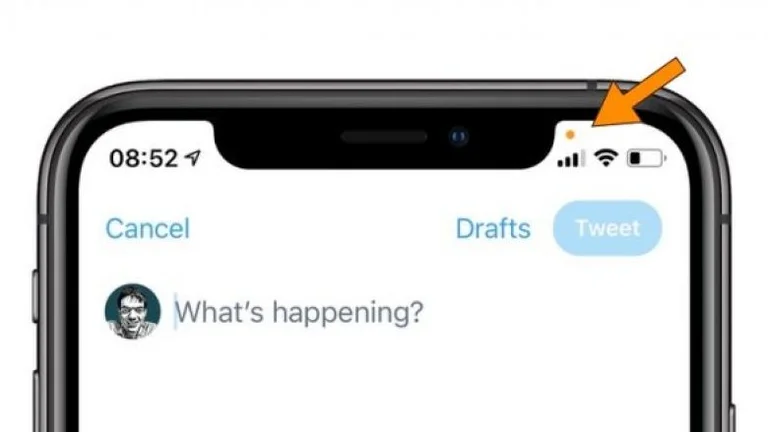
(6 years ago)Many iPhone users are observing a small orange dot that appears on the top of their screen after update in the latest version of IOS. The orange dot has been added as a way to see whether the iPhone microphone has been activated, writes Metro.co.uk. So what is it? Upgrade [...]
The orange dot has been added as a way to see whether the iPhone microphone has been activated, writes Metro.co.uk.
So what is it? The new update of Apple's OS 14 operating system comes with a huge focus on security and privacy.
As part of your iPhone's new update, Apple added an index light that tells you when an app is using your microphone and camera, and this comes in the form of an orange or green point, transmits Telegrafi.
This is similar to most laptops that light a small light to show that the camera is in use.
It looks scary, but looking at the point on the top of the screen is not a reason to be alarmed at all. Some apps should use your microphone ( orange point) or camera (green point) in order to function.
“An indicator appears on the upper part of your screen whenever an app is using your microphone or camera. And at the Control Center, you can see if an app has recently used them”, Apple wrote.
In order to get access to function, you'll have to update on IOS 14.
Here's the complete list of iPhone models that can get the latest version of S:
iPhone 11
iPhone 11 Pro
iPhone 11 pro Max
iPhone XS
iPhone XS Max
iPhone XR
iPhone X
iPhone 8
iPhone 8 Plus
iPhone 7
iPhone 7 Plus
iPhone 6
iPhone 6s Plus
iPhone SE (first generation)
iPhone SE (second generation)
iPod Touch.